
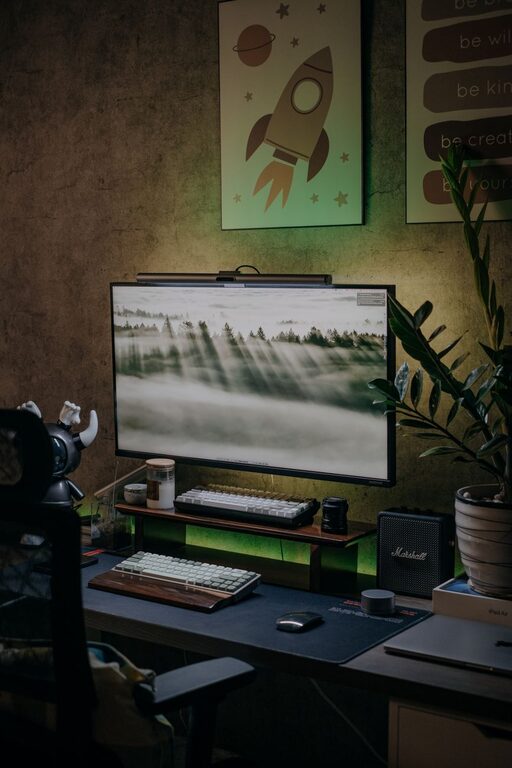
Creating a home office that feels cozy and encourages productivity can make a significant difference in your daily work routine. Whether you’re working remotely full-time or occasionally need a dedicated workspace, setting up the right environment will help you stay motivated and comfortable. This guide offers practical tips to help you design a home office that balances comfort with efficiency.
Choose the Right Location
Finding the best spot for your home office is the first step. Consider these aspects:
– Natural Light: Aim for a space near windows to take advantage of natural light, which can improve mood and reduce eye strain.
– Quiet Environment: Select an area away from household distractions like the TV or high-traffic zones.
– Adequate Space: Ensure there’s enough room for your desk, chair, and storage solutions without feeling cramped.
If space is limited, even a corner or a section of a room can become a functional office with some creativity.
Invest in a Comfortable Chair and Desk
Comfort is key when you spend many hours working at a desk. Prioritize ergonomic furniture to support your posture and reduce discomfort.
– Ergonomic Chair: Look for adjustable features like lumbar support, height, and armrests to fit your body.
– Appropriate Desk Height: Your desk should allow your arms to rest comfortably while typing, with wrists straight.
– Standing Options: Consider a sit-stand desk or a standing desk converter to alternate postures throughout the day.
Comfortable furniture helps maintain focus and prevents aches that can distract from work.
Organize Your Workspace Efficiently
A cluttered desk can make it harder to concentrate. Keep your workspace tidy with these organizational tips:
– Use Storage Solutions: Shelves, drawers, and boxes can keep papers, supplies, and gadgets out of sight but within reach.
– Cable Management: Use clips or sleeves to organize cords and reduce clutter.
– Minimal Decor: Limit decorations to a few inspiring items that do not crowd the space.
An orderly workspace signals your brain that it’s time to work, making it easier to stay on task.
Personalize with Cozy Touches
Adding cozy elements makes the office inviting and reduces the sterile, clinical feel often associated with workspaces.
– Soft Textiles: Add a comfortable rug, cushions, or a throw blanket.
– Plants: Indoor plants improve air quality and bring a touch of nature indoors.
– Warm Lighting: Use lamps with soft, warm bulbs rather than harsh overhead lights.
– Artwork or Photos: Display items that motivate or inspire you, but keep it simple.
Personal touches help create an environment where you look forward to spending time.
Control Noise and Distractions
Maintaining focus can be challenging, especially at home. Here are ways to manage sound and interruptions:
– Noise-Canceling Headphones: Use them to block background noise or to listen to calming music.
– Soundproofing: Adding rugs, curtains, or acoustic panels can reduce echo and noise.
– Set Boundaries: Communicate your work hours to household members to minimize interruptions.
A quiet and controlled atmosphere lets you concentrate better and improves work quality.
Optimize Lighting for Productivity
Good lighting reduces eye strain and enhances concentration.
– Natural Light First: Position your desk so natural light illuminates your workspace without causing glare on screens.
– Task Lighting: A desk lamp with adjustable brightness helps focus light where needed.
– Avoid Overhead Fluorescent Lights: They can be harsh and tiring over long periods.
Adjust your lighting based on the time of day and type of work to keep your eyes comfortable.
Incorporate Technology Intelligently
Having the right tools can streamline your work without causing frustration.
– Reliable Internet: A strong Wi-Fi connection or wired Ethernet ensures smooth communication and downloads.
– Multiple Monitors: If your work requires multitasking, extra screens can improve efficiency.
– Docking Stations and Accessories: Reduce clutter and make connecting peripherals easier.
Invest in quality equipment that supports your workflow.
Take Regular Breaks and Move Around
Even in a cozy setup, sitting for long periods can lead to fatigue. To stay alert:
– Follow the 20-20-20 Rule: Every 20 minutes, look at something 20 feet away for 20 seconds.
– Stretch and Move: Stand up and stretch or walk around briefly every hour.
– Schedule Breaks: Use timers or apps to remind you to step away from your desk.
Movement resets your body and mind, boosting productivity.
—
Creating a home office that combines comfort with function takes some thought but pays off with improved focus and well-being. By thoughtfully choosing your location, investing in ergonomic furniture, organizing efficiently, and adding personal touches, you can build a workspace that makes working from home a pleasure rather than a chore. Remember, the goal is to create an environment where you feel both relaxed and ready to be productive.